---
title: Human Interfaz Universal - Importar Campos de Usuario.
description: Guía para diseñar el layout en Human Interfaz Universal, capturar datos en Excel y exportarlos a .txt con tabulaciones para importar campos de usuario.
---
[Saltar al contenido](https://conocimiento.humaneland.net/base-conocimientos/human-interfaz-universal-importar-campos-de-usuario#main-content)
Español - México
Traducciones de Mostrar submenú para

- [Sitio web](https://venturessoft.com/)
- [Blog](https://venturessoft.com/blog/)
- [Sobre nosotros](https://venturessoft.com/acerca-de-venturessoft/)
Abrir navegación principal
Cerrar navegación principal
- [Sitio web](https://venturessoft.com/)
- [Blog](https://venturessoft.com/blog/)
- [Sobre nosotros](https://venturessoft.com/acerca-de-venturessoft/)
- Español - México
Traducciones de Mostrar submenú para
- [Registro de Tickets](https://clientes.humaneland.net/portal_cliente)
[Registro de Tickets](https://clientes.humaneland.net/portal_cliente?hsLang=es-mx)
¿Cómo podemos ayudarte?
- No hay sugerencias porque el campo de búsqueda está vacío.
1. [Base de Conocimientos VenturesSoft | Guías de usuario](https://conocimiento.humaneland.net/base-conocimientos?hsLang=es-mx)
2. [Human Interfaz Universal](https://conocimiento.humaneland.net/base-conocimientos/human-interfaz-universal?hsLang=es-mx)
23 de diciembre de 2025
# Human Interfaz Universal - Importar Campos de Usuario.
Creación de Layout
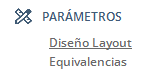
Ruta: Human Interface Universal / Parámetros / Diseño Layout.
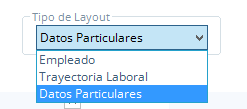
1\. Te mostrara el campo Tipo Layout, debes elegir el tipo Datos Particulares.
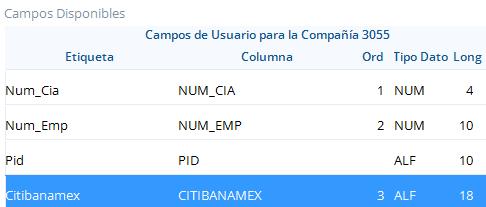
2. En la sección izquierda Campos Disponibles, ubica el campo particular, para la presente guía se creo el campo Citibanamex, selecciónalo y arrástralo para la parte derecha Layout.
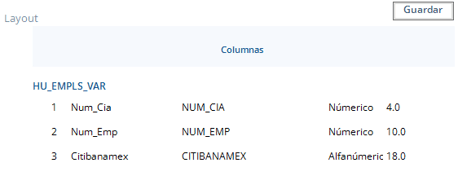
3. Haz clic en el botón guardar del menú principal  para guardar la configuración del layout.
4. Haz clic en el botón  abrirá en automático la ventana Select File, para guardar el layout, indica la ruta y respeta el tipo de archivo .xls.
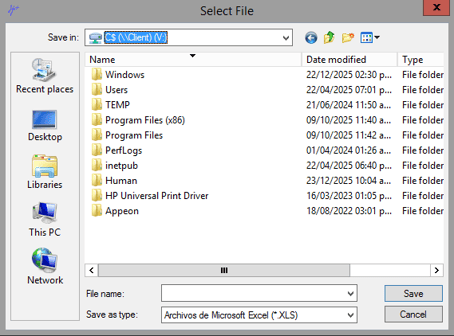
Preparar Layout.
5. Abre el layout que guardo previamente y capture los campos.
- NUM\_CIA, número de compañía.
- NUM\_EMP, números de empleados.
- CITIBANAMEX, número de cuenta correspondiente.
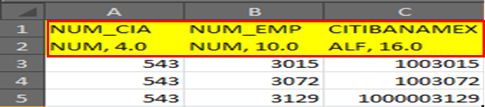
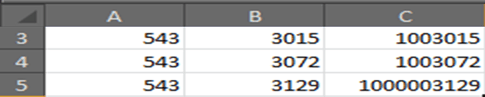
6. Elimina los cabeceros del archivo Excel, es decir fila 1 y 2.
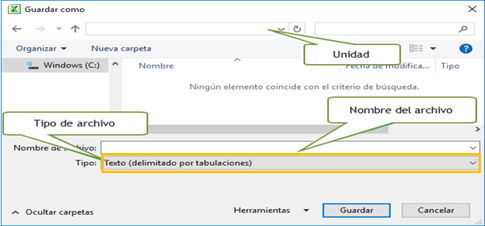
7. Guarda el archivo, como Texto delimitado por tabulaciones.
Importar Campos de usuario.
Ruta: Ejecución / Ejecución de la interface / Pestaña Particulares.
8. Haz clic en el folder que se encuentra de lado izquierdo del campo Datos Particulares.

9. Te mostrar la pantalla Select File, te solicitando la ruta del archivo. Es el que previamente se preparó en el punto PrepararLayout.
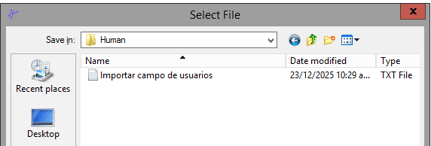
10. Una vez asociado el archivo deberás hacer clic en el botón Ejecutar Cálculo.
11. Al terminar la carga del archivo, se mostrará en pantalla, el resultado de la carga de información.
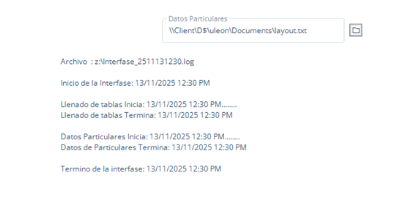
12\. Valida la información en Human CORE / Altas y Cambios / Selecciona el empleado / Pestaña Particulares.
- [Configuración](https://conocimiento.humaneland.net/base-conocimientos/configuraci%C3%B3n?hsLang=es-mx#main-content)
- [Parámetros](https://conocimiento.humaneland.net/base-conocimientos/configuraci%C3%B3n?hsLang=es-mx#par%C3%A1metros)
- [Human Core](https://conocimiento.humaneland.net/base-conocimientos/human-core?hsLang=es-mx#main-content)
- [Movimientos y Transferencias](https://conocimiento.humaneland.net/base-conocimientos/human-core?hsLang=es-mx#movimientos-y-transferencias)
- [Altas y cambios](https://conocimiento.humaneland.net/base-conocimientos/human-core?hsLang=es-mx#altas-y-cambios)
- [Zonas Económicas](https://conocimiento.humaneland.net/base-conocimientos/human-core?hsLang=es-mx#zonas-econ%C3%B3micas)
- [Actualizaciones masivas](https://conocimiento.humaneland.net/base-conocimientos/human-core?hsLang=es-mx#actualizaciones-masivas)
- [Parámetros](https://conocimiento.humaneland.net/base-conocimientos/human-core?hsLang=es-mx#par%C3%A1metros)
- [Estructura Departamental](https://conocimiento.humaneland.net/base-conocimientos/human-core?hsLang=es-mx#estructura-departamental)
- [Bajas](https://conocimiento.humaneland.net/base-conocimientos/human-core?hsLang=es-mx#bajas)
- [Reportes](https://conocimiento.humaneland.net/base-conocimientos/human-core?hsLang=es-mx#reportes)
- [Human Procesos](https://conocimiento.humaneland.net/base-conocimientos/human-procesos?hsLang=es-mx#main-content)
- [Timbrado](https://conocimiento.humaneland.net/base-conocimientos/human-procesos?hsLang=es-mx#timbrado)
- [Generación Masiva de CFDI individuales](https://conocimiento.humaneland.net/base-conocimientos/human-procesos?hsLang=es-mx#generaci%C3%B3n-masiva-de-cfdi-individuales)
- [Movimientos de Excepción](https://conocimiento.humaneland.net/base-conocimientos/human-procesos?hsLang=es-mx#movimientos-de-excepci%C3%B3n)
- [Procesos de Pago](https://conocimiento.humaneland.net/base-conocimientos/human-procesos?hsLang=es-mx#procesos-de-pago)
- [Reportes](https://conocimiento.humaneland.net/base-conocimientos/human-procesos?hsLang=es-mx#reportes)
- [Parámetros](https://conocimiento.humaneland.net/base-conocimientos/human-procesos?hsLang=es-mx#par%C3%A1metros)
- [Human WorkSocial](https://conocimiento.humaneland.net/base-conocimientos/human-worksocial?hsLang=es-mx#main-content)
- [Interconexión](https://conocimiento.humaneland.net/base-conocimientos/human-worksocial?hsLang=es-mx#interconexi%C3%B3n)
- [Parámetros](https://conocimiento.humaneland.net/base-conocimientos/human-worksocial?hsLang=es-mx#par%C3%A1metros)
- [Human Control de Tiempos](https://conocimiento.humaneland.net/base-conocimientos/human-control-de-tiempos?hsLang=es-mx#main-content)
- [Parámetros](https://conocimiento.humaneland.net/base-conocimientos/human-control-de-tiempos?hsLang=es-mx#par%C3%A1metros)
- [Human Vacaciones](https://conocimiento.humaneland.net/base-conocimientos/human-vacaciones?hsLang=es-mx)
- [Human Seguridad Social](https://conocimiento.humaneland.net/base-conocimientos/human-seguridad-social?hsLang=es-mx#main-content)
- [Ajuste a Movimientos](https://conocimiento.humaneland.net/base-conocimientos/human-seguridad-social?hsLang=es-mx#ajuste-a-movimientos)
- [Human Tools](https://conocimiento.humaneland.net/base-conocimientos/human-tools?hsLang=es-mx#main-content)
- [Mantenimiento a Usuarios](https://conocimiento.humaneland.net/base-conocimientos/human-tools?hsLang=es-mx#mantenimiento-a-usuarios)
- [Human Lock](https://conocimiento.humaneland.net/base-conocimientos/human-lock?hsLang=es-mx)
- [Human Diseño de Reportes](https://conocimiento.humaneland.net/base-conocimientos/human-dise%C3%B1o-de-reportes?hsLang=es-mx#main-content)
- [Consulta de tablas](https://conocimiento.humaneland.net/base-conocimientos/human-dise%C3%B1o-de-reportes?hsLang=es-mx#consulta-de-tablas)
- [Human Interfaz Universal](https://conocimiento.humaneland.net/base-conocimientos/human-interfaz-universal?hsLang=es-mx)
- [Human Presupuesto](https://conocimiento.humaneland.net/base-conocimientos/human-presupuesto?hsLang=es-mx)
- [Desinstalación de Appeon y componentes](https://conocimiento.humaneland.net/base-conocimientos/desinstalaci%C3%B3n-de-appeon-y-componentes?hsLang=es-mx)
[](http://logo_venturessoft.com?hsLang=es-mx)
[mailto:email@email.com](mailto:email@email.com)
Copyright © 2025, Ventures Soft