---
title: Human WorkSocial - Documentos Corporativos.
description: Administra en Human WorkSocial los documentos corporativos de tu organización, definiendo accesos, categorías y visibilidad para una gestión ordenada y segura.
---
[Saltar al contenido](https://conocimiento.humaneland.net/base-conocimientos/human-worksocial-documentos-corporativos#main-content)
Español - México
Traducciones de Mostrar submenú para

- [Sitio web](https://venturessoft.com/)
- [Blog](https://venturessoft.com/blog/)
- [Sobre nosotros](https://venturessoft.com/acerca-de-venturessoft/)
Abrir navegación principal
Cerrar navegación principal
- [Sitio web](https://venturessoft.com/)
- [Blog](https://venturessoft.com/blog/)
- [Sobre nosotros](https://venturessoft.com/acerca-de-venturessoft/)
- Español - México
Traducciones de Mostrar submenú para
- [Registro de Tickets](https://clientes.humaneland.net/portal_cliente)
[Registro de Tickets](https://clientes.humaneland.net/portal_cliente?hsLang=es-mx)
¿Cómo podemos ayudarte?
- No hay sugerencias porque el campo de búsqueda está vacío.
1. [Base de Conocimientos VenturesSoft | Guías de usuario](https://conocimiento.humaneland.net/base-conocimientos?hsLang=es-mx)
2. [Human Core](https://conocimiento.humaneland.net/base-conocimientos/human-core?hsLang=es-mx)
5 de enero de 2026
# Human WorkSocial - Documentos Corporativos.
¿Cómo configura un documento corporativo?
Dar de alta el Documento Corporativo.
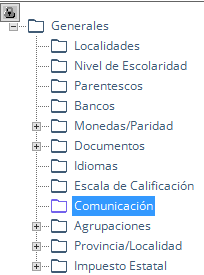
Ruta: Core /En la parte superior derecha se muestra el nombre de usuario, haz clic / Parámetros / Generales.
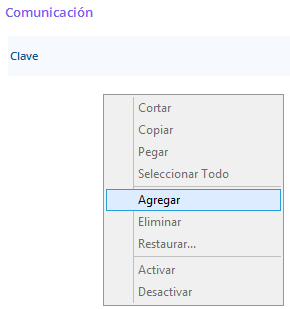
1. En la parte derecha de la pantalla, haz clic derecho, selecciona la opción Agregar.
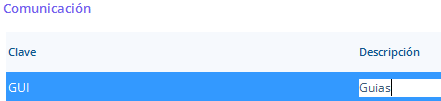
2. Captura la clave y descripción del Documento Corporativo.
3. Haz clic en el botón Guardar.
Configura Documento Corporativo.
Ruta: Core /En la parte superior derecha se muestra el nombre de usuario, haz clic / Comunicados.
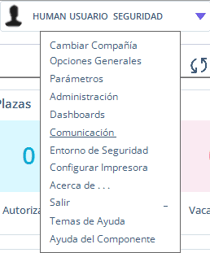
5. En la parte derecha de la pantalla, haz clic derecho, selecciona la opción Agregar.
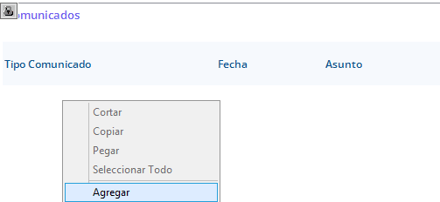
6. Captura el Tipo Comunicado, Fecha, Asunto, Acceso.

7. Haz clic en el Botón Guardar. 
Carga Documento Corporativo**.**
8\. Haz clic en el botón Guardar y Abrir Documento. 
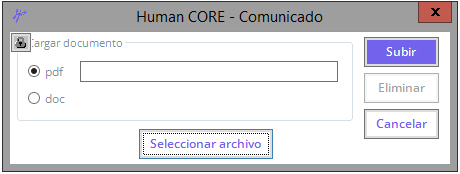
9. Te mostrar la pantalla Comunicado, haz clic en el botón Seleccionar Archivo.
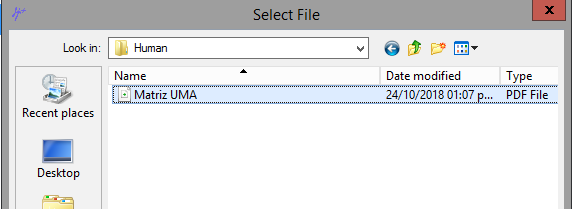
10. Muestra la pantalla Select File, para que busques y subas el documento que se publicara en WorkSocial.
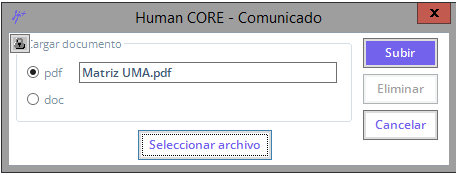
11. En la pantalla Comunicado, ahora se mostrara el nombre y extensión del documento que se publicara, haz clic en el botón Subir.
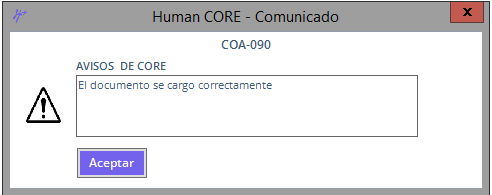
12. Enviara un aviso indicándote que el documento se cargo correctamente, haz clic en el botón Aceptar.
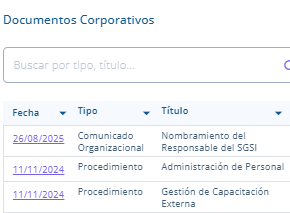
Ingresa a WorkSocial y en el apartado Documento Corporativos, podrás ver publicado el documento previamente configurado.
- [Configuración](https://conocimiento.humaneland.net/base-conocimientos/configuraci%C3%B3n?hsLang=es-mx#main-content)
- [Parámetros](https://conocimiento.humaneland.net/base-conocimientos/configuraci%C3%B3n?hsLang=es-mx#par%C3%A1metros)
- [Human Core](https://conocimiento.humaneland.net/base-conocimientos/human-core?hsLang=es-mx#main-content)
- [Movimientos y Transferencias](https://conocimiento.humaneland.net/base-conocimientos/human-core?hsLang=es-mx#movimientos-y-transferencias)
- [Altas y cambios](https://conocimiento.humaneland.net/base-conocimientos/human-core?hsLang=es-mx#altas-y-cambios)
- [Zonas Económicas](https://conocimiento.humaneland.net/base-conocimientos/human-core?hsLang=es-mx#zonas-econ%C3%B3micas)
- [Actualizaciones masivas](https://conocimiento.humaneland.net/base-conocimientos/human-core?hsLang=es-mx#actualizaciones-masivas)
- [Parámetros](https://conocimiento.humaneland.net/base-conocimientos/human-core?hsLang=es-mx#par%C3%A1metros)
- [Estructura Departamental](https://conocimiento.humaneland.net/base-conocimientos/human-core?hsLang=es-mx#estructura-departamental)
- [Bajas](https://conocimiento.humaneland.net/base-conocimientos/human-core?hsLang=es-mx#bajas)
- [Reportes](https://conocimiento.humaneland.net/base-conocimientos/human-core?hsLang=es-mx#reportes)
- [Human Procesos](https://conocimiento.humaneland.net/base-conocimientos/human-procesos?hsLang=es-mx#main-content)
- [Timbrado](https://conocimiento.humaneland.net/base-conocimientos/human-procesos?hsLang=es-mx#timbrado)
- [Generación Masiva de CFDI individuales](https://conocimiento.humaneland.net/base-conocimientos/human-procesos?hsLang=es-mx#generaci%C3%B3n-masiva-de-cfdi-individuales)
- [Movimientos de Excepción](https://conocimiento.humaneland.net/base-conocimientos/human-procesos?hsLang=es-mx#movimientos-de-excepci%C3%B3n)
- [Procesos de Pago](https://conocimiento.humaneland.net/base-conocimientos/human-procesos?hsLang=es-mx#procesos-de-pago)
- [Reportes](https://conocimiento.humaneland.net/base-conocimientos/human-procesos?hsLang=es-mx#reportes)
- [Parámetros](https://conocimiento.humaneland.net/base-conocimientos/human-procesos?hsLang=es-mx#par%C3%A1metros)
- [Human WorkSocial](https://conocimiento.humaneland.net/base-conocimientos/human-worksocial?hsLang=es-mx#main-content)
- [Interconexión](https://conocimiento.humaneland.net/base-conocimientos/human-worksocial?hsLang=es-mx#interconexi%C3%B3n)
- [Parámetros](https://conocimiento.humaneland.net/base-conocimientos/human-worksocial?hsLang=es-mx#par%C3%A1metros)
- [Human Control de Tiempos](https://conocimiento.humaneland.net/base-conocimientos/human-control-de-tiempos?hsLang=es-mx#main-content)
- [Parámetros](https://conocimiento.humaneland.net/base-conocimientos/human-control-de-tiempos?hsLang=es-mx#par%C3%A1metros)
- [Human Vacaciones](https://conocimiento.humaneland.net/base-conocimientos/human-vacaciones?hsLang=es-mx)
- [Human Seguridad Social](https://conocimiento.humaneland.net/base-conocimientos/human-seguridad-social?hsLang=es-mx#main-content)
- [Ajuste a Movimientos](https://conocimiento.humaneland.net/base-conocimientos/human-seguridad-social?hsLang=es-mx#ajuste-a-movimientos)
- [Human Tools](https://conocimiento.humaneland.net/base-conocimientos/human-tools?hsLang=es-mx#main-content)
- [Mantenimiento a Usuarios](https://conocimiento.humaneland.net/base-conocimientos/human-tools?hsLang=es-mx#mantenimiento-a-usuarios)
- [Human Lock](https://conocimiento.humaneland.net/base-conocimientos/human-lock?hsLang=es-mx)
- [Human Diseño de Reportes](https://conocimiento.humaneland.net/base-conocimientos/human-dise%C3%B1o-de-reportes?hsLang=es-mx#main-content)
- [Consulta de tablas](https://conocimiento.humaneland.net/base-conocimientos/human-dise%C3%B1o-de-reportes?hsLang=es-mx#consulta-de-tablas)
- [Human Interfaz Universal](https://conocimiento.humaneland.net/base-conocimientos/human-interfaz-universal?hsLang=es-mx)
- [Human Presupuesto](https://conocimiento.humaneland.net/base-conocimientos/human-presupuesto?hsLang=es-mx)
- [Desinstalación de Appeon y componentes](https://conocimiento.humaneland.net/base-conocimientos/desinstalaci%C3%B3n-de-appeon-y-componentes?hsLang=es-mx)
[](http://logo_venturessoft.com?hsLang=es-mx)
[mailto:email@email.com](mailto:email@email.com)
Copyright © 2025, Ventures Soft